


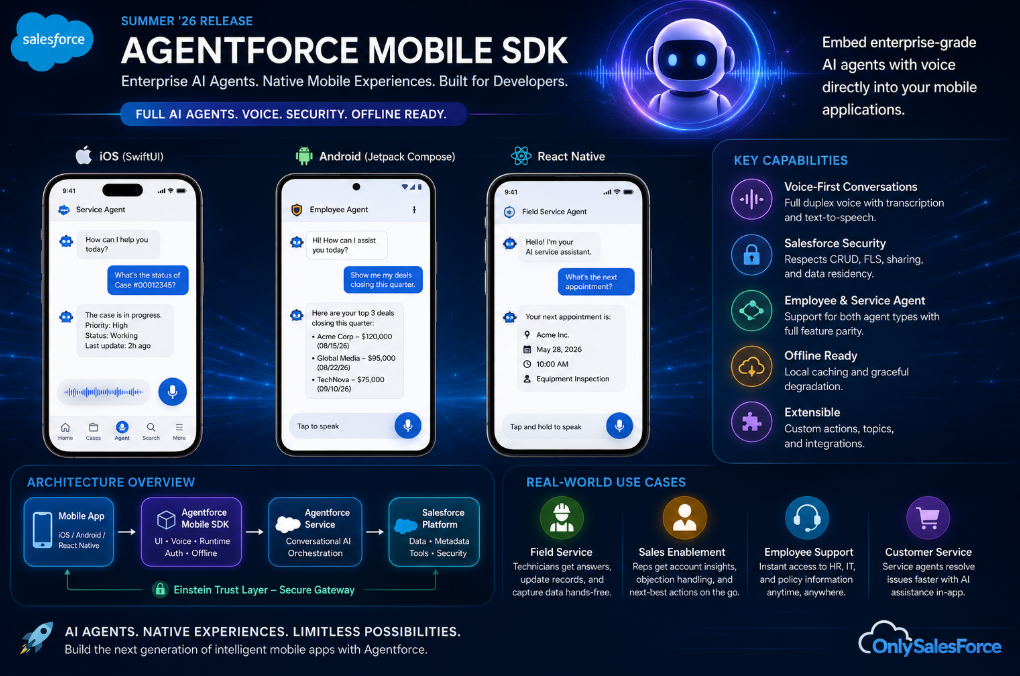
The Summer ’26 release makes it possible to embed enterprise-grade AI agents with voice capabilities directly into your mobile applications — no browser required.
Enterprise AI has spent the last two years confined to browser tabs. Users open Salesforce, navigate to an agent, type a question, and wait. The Agentforce Mobile SDK, now generally available in the Salesforce Summer ’26 release, fundamentally changes that equation. For the first time, developers can embed full Agentforce capabilities — including voice — directly into native iOS, Android, and React Native applications.
This is not a chatbot widget. The SDK provides a complete conversational AI runtime that respects Salesforce’s security model, supports both Employee and Service Agent configurations, and delivers a native user experience on every platform. If you’re building mobile applications that touch Salesforce data, this is the most significant developer release of the cycle.
In this guide, we’ll walk through the architecture, implementation patterns, and real-world use cases for the Agentforce Mobile SDK — with working code examples for iOS (SwiftUI), Android (Jetpack Compose), and React Native.
What Is the Agentforce Mobile SDK?
The Agentforce Mobile SDK is Salesforce’s official library for embedding AI agent experiences into native mobile applications. It acts as the bridge between your mobile app and the Agentforce platform, handling authentication, conversation management, UI rendering, and — with the Summer ’26 release — voice interactions.
Key capabilities include:
- Conversational Intelligence: Natural language understanding that processes user requests via text or voice
- Salesforce Actions: Execute actions within Salesforce — creating records, updating fields, running Apex classes — directly from the conversation
- Agentforce Voice: Real-time voice-to-voice conversations with AI agents, powered by LiveKit WebRTC infrastructure
- Full UI and Headless modes: Use the pre-built chat interface or drive your own custom UI
- Multi-agent support: Employee Agents for internal use cases and Service Agents for customer-facing scenarios
- 28 languages: Full localization including Portuguese, Spanish, Japanese, Korean, and Arabic
Architecture Overview
The SDK follows a clean layered architecture that separates concerns across three tiers:
Authentication Layer: The credential provider handles OAuth, JWT, and guest authentication flows. Your app supplies credentials; the SDK manages token refresh and session persistence automatically.
Conversation Layer: The AgentforceClient manages conversation lifecycle — starting sessions, routing messages, handling handoffs between agents, and maintaining conversation state.
Presentation Layer: Platform-native UI components render the chat interface. On iOS, this is built with SwiftUI. On Android, Jetpack Compose. React Native bridges to both native implementations.
Platform Requirements
| Platform | Minimum Version | UI Framework |
|---|---|---|
| iOS | iOS 17+ | SwiftUI |
| Android | API 29+ (Android 10) | Jetpack Compose |
| React Native | 0.72+ | Native bridge (iOS 17+ / API 29+) |
Prerequisites: Setting Up Your Salesforce Org
Before writing any mobile code, you need to configure your Salesforce org:
- Enable Einstein Generative AI — Setup > Einstein Generative AI
- Enable Agentforce — Setup > Agentforce
- Create an Agent — Either an Employee Agent (internal) or Service Agent (customer-facing)
- For Service Agents only: Set up Enhanced Chat in Service Cloud and create an Embedded Service Deployment with deployment type set to Mobile
You’ll need these values from your org:
| Value | Where to Find | Used By |
|---|---|---|
| Agent ID | Agent Details page URL (18-char ID) | Employee Agent |
| User ID | User profile page | Employee Agent |
| My Domain URL | Setup > My Domain | Employee Agent |
| Service API URL | Embedded Service Deployments > Settings | Service Agent |
| Organization ID | Setup > Company Information | Both |
| ES Developer Name | Embedded Service Deployments > Developer Name | Service Agent |
Implementation: iOS with SwiftUI
Step 1: Install Dependencies
Add the Agentforce SDK via CocoaPods:
# Add to the top of your Podfile
source 'https://github.com/forcedotcom/SalesforceMobileSDK-iOS-Specs.git'
source 'https://github.com/livekit/podspecs.git'
source 'https://cdn.cocoapods.org/'

target 'MyApp' do
  pod 'AgentforceSDK'
  pod 'Messaging-InApp-Core', '> 1.10.0'
  pod 'LiveKitClient'
end

post_install do |installer|
  installer.pods_project.targets.each do |target|
    target.build_configurations.each do |config|
      config.build_settings['BUILD_LIBRARY_FOR_DISTRIBUTION'] = 'YES'
    end
  end
endStep 2: Implement the Credential Provider
The SDK supports three authentication methods. Here’s the OAuth pattern:
import AgentforceSDK

class MyAppCredentialProvider: AgentforceAuthCredentialProviding {
    public func getAuthCredentials() -> AgentforceAuthCredentials {
        return .OAuth(
            authToken: "YOUR_AUTH_TOKEN",
            orgId: "YOUR_ORG_ID",
            userId: "YOUR_USER_ID"
        )
    }
}For server-side token management, use the JWT pattern:
class MyAppCredentialProvider: AgentforceAuthCredentialProviding {
    public func getAuthCredentials() -> AgentforceAuthCredentials {
        return .OrgJWT(orgJWT: "YOUR_ORG_JWT")
    }
}Step 3: Configure and Launch the Agent
For an Employee Agent:
let user = User(
    userId: "YOUR_USER_ID",
    org: Org(id: "YOUR_ORG_ID"),
    displayName: "Field Rep"
)

let config = EmployeeAgentConfiguration(
    user: user,
    forceConfigEndpoint: "https://your-domain.my.salesforce.com"
)

let client = AgentforceClient(
    credentialProvider: credentialProvider,
    mode: .employeeAgent(config)
)

// Start conversation and present UI
let conversation = client.startAgentforceConversation(
    forAgentId: "YOUR_AGENT_ID"
)
let chatView = try client.createAgentforceChatView(
    conversation: conversation,
    delegate: nil,
    onContainerClose: { /* handle close */ }
)For a Service Agent (customer-facing):
let serviceConfig = ServiceAgentConfiguration(
    esDeveloperName: "YOUR_CHAT_DEVELOPER_NAME",
    organizationId: "YOUR_ORG_ID",
    serviceApiURL: "https://your-service-api-url.com",
    serviceUISettings: ServiceUISettings(
        downloadTranscript: false,
        endConversation: true
    )
)

let serviceClient = AgentforceClient(
    credentialProvider: credentialProvider,
    mode: .serviceAgent(serviceConfig)
)Implementation: Android with Jetpack Compose
Step 1: Add Dependencies
// settings.gradle.kts
dependencyResolutionManagement {
    repositories {
        google()
        mavenCentral()
        maven { url = uri("https://jitpack.io") }
        maven { url = uri("https://opensource.salesforce.com/AgentforceMobileSDK-Android/agentforce-sdk-repository") }
        maven { url = uri("https://s3.amazonaws.com/inapp.salesforce.com/public/android") }
    }
}

// app/build.gradle.kts
dependencies {
    api("com.salesforce.android.agentforcesdk:agentforce-sdk:14.97.1")
    coreLibraryDesugaring("com.android.tools:desugar_jdk_libs:2.1.5")
    implementation("org.jetbrains.kotlinx:kotlinx-serialization-json:1.6.3")
}Step 2: Configure and Launch
import com.salesforce.android.agentforceservice.*

class MyAppCredentialProvider : AgentforceAuthCredentialProvider {
    override fun getAuthCredentials(): AgentforceAuthCredentials {
        return AgentforceAuthCredentials.OAuth(
            authToken = "YOUR_AUTH_TOKEN",
            orgId = "YOUR_ORG_ID",
            userId = "YOUR_USER_ID"
        )
    }
}

// Build configuration
val configuration = AgentforceConfiguration.builder(
    authCredentialProvider = myAuthCredentialProvider
)
    .setApplication(application)
    .setSalesforceDomain("https://your-domain.my.salesforce.com")
    .setAgentId("YOUR_AGENT_ID")
    .build()

// Initialize client
agentforceClient?.init(
    authCredentialProvider = configuration.authCredentialProvider,
    agentforceMode = AgentforceMode.FullConfig(configuration),
    application = application
)

// Start conversation
val conversation = agentforceClient.startAgentforceConversation()Step 3: Add the Compose UI
@Composable
fun AgentChatScreen(
    agentforceClient: AgentforceClient,
    conversation: AgentforceConversation,
    onClose: () -> Unit
) {
    agentforceClient.AgentforceConversationContainer(
        conversation = conversation,
        onClose = onClose
    )
}The AgentforceConversationContainer is a fully styled Compose component that handles message rendering, input fields, typing indicators, and action confirmations out of the box.
Agentforce Voice: Conversational AI on Mobile
The most transformative feature in the Summer ’26 release is Agentforce Voice, which enables real-time voice conversations with AI agents directly within your mobile app. This isn’t speech-to-text piped through a chatbot — it’s a full duplex voice channel built on LiveKit WebRTC infrastructure.
How Agentforce Voice Works
When a user initiates a voice session, the SDK establishes a WebRTC connection to Salesforce’s voice infrastructure. The agent processes spoken input in real time, generates responses, and speaks back — all while maintaining the same security context and action capabilities as a text conversation.
The SDK supports injectable Speech-to-Text (STT) and Text-to-Speech (TTS) parameters, allowing you to customize the voice pipeline or integrate third-party providers like Deepgram for specialized transcription needs.
Adding Voice to Your iOS App
Starting with SDK version 260.4, the Agentforce Voice module is included. To enable voice in your iOS implementation, ensure you’ve added the LiveKitClient dependency and configure the voice parameters in your agent setup:
// Voice is automatically available when LiveKitClient is included
// The SDK handles WebRTC connection management internally
let conversation = client.startAgentforceConversation(
    forAgentId: "YOUR_AGENT_ID"
)

// The chat view automatically supports voice input
// Users tap the microphone icon to switch to voice modeAdding Voice to Your Android App
On Android, the voice module follows the same pattern. The Jetpack Compose UI includes a microphone toggle that activates the voice channel:
// Voice capabilities are included with the base SDK dependency
// The AgentforceConversationContainer renders voice controls automatically
agentforceClient.AgentforceConversationContainer(
    conversation = conversation,
    onClose = onClose
)Real-World Use Cases
1. Field Service with Hands-Free AI
A field technician servicing industrial equipment can use voice commands while wearing gloves: “What’s the standard procedure for replacing the hydraulic pump on model X-400?” The agent pulls documentation from the knowledge base, walks through the steps audibly, and logs the service activity — all without touching the screen.
2. Sales Floor Intelligence
A retail sales associate uses an Employee Agent on their store device: “Show me the top-selling items this week that are below 30% inventory.” The agent queries Data 360, surfaces the results, and can even trigger a replenishment order — all within a single conversational flow.
3. Customer Self-Service
A customer opens a brand’s mobile app and speaks: “I need to return the shoes I ordered last Tuesday.” The Service Agent identifies the order, checks return eligibility, generates a return label, and sends a confirmation — no hold music, no transfers, no friction.
4. Executive Dashboard Queries
A VP of Sales on the go asks their mobile app: “What’s our pipeline coverage ratio for Q3 in EMEA?” The agent queries CRM Analytics, presents the number with context, and offers to drill into specific opportunities — all via voice while walking between meetings.
Security and Authentication Patterns
The SDK respects the full Salesforce security model. All agent interactions are governed by the authenticated user’s permissions, sharing rules, and field-level security. The three authentication patterns serve different scenarios:
- OAuth: Best for apps that already have Salesforce authentication flows. Pass the existing auth token, org ID, and user ID.
- JWT (OrgJWT): Ideal for server-managed authentication where your backend generates and refreshes tokens. The mobile app never handles raw credentials.
- Guest: For public-facing Service Agent deployments where no Salesforce user authentication is required. Limited to anonymous agent interactions.
The SDK stores session data in platform-specific secure storage (iOS Keychain, Android Keystore + SharedPreferences). Deleting this data will break the SDK — handle with care during app cleanup routines.
Customization: Branding and Theming
Both platforms support deep visual customization through theme managers. On Android:
val configuration = AgentforceConfiguration.builder(
    authCredentialProvider = myAuthCredentialProvider
).setThemeManager(createCustomAgentforceThemeManager(
        themeMode = AgentforceThemeMode.SYSTEM
))
.build()On iOS, the chat view respects your app’s SwiftUI environment and can be styled through the standard SwiftUI modifier chain. The SDK provides branded color schemes, custom fonts, and adjustable layouts to match your application’s design system.
Headless Mode: Building Custom Experiences
For teams that need complete control over the user interface, the SDK offers a headless mode. You manage the conversation state and UI while Agentforce handles the AI logic:
- Send messages programmatically
- Receive structured responses
- Render messages in your own custom UI components
- Integrate agent interactions into existing app workflows
- Build specialized interfaces for accessibility needs
This pattern is particularly valuable for enterprise apps where the agent experience needs to feel like a native part of the application, not a bolted-on chat widget.
Impact for Developers and Organizations
The Agentforce Mobile SDK represents a fundamental shift in how Salesforce AI capabilities are delivered to end users. For developers, it eliminates the need to build custom API integrations between mobile apps and Agentforce — the SDK handles conversation management, authentication, and UI rendering natively.
For organizations, the implications are significant:
- Reduced development time: What previously required custom API work, WebSocket management, and UI development now takes minutes with the SDK’s pre-built components
- Consistent experience: The same agent logic that powers browser-based interactions now runs natively on mobile, with the same security model
- Voice-first workflows: Field workers, retail associates, and mobile executives can interact with AI agents through natural voice conversation
- Faster time to value: The 15-minute quick start guides for iOS and Android mean teams can prototype agent experiences in a single sprint
Getting Started Today
The Agentforce Mobile SDK is available now as part of the Summer ’26 release. To start building:
- Ensure your Salesforce org has Einstein Generative AI and Agentforce enabled
- Create your agent (Employee or Service) in Setup
- Follow the platform-specific Quick Start guide — iOS, Android, or React Native
- Explore Agentforce Voice by including the LiveKit dependency
- Customize the UI to match your app’s design system
The SDK repositories are open source on GitHub:
- Agentforce Mobile SDK for iOS
- Agentforce Mobile SDK for Android
- Agentforce Mobile SDK for React Native
The era of browser-only AI agents is over. With the Agentforce Mobile SDK, every mobile app in your Salesforce ecosystem can become an intelligent, conversational interface — and with Agentforce Voice, that conversation can happen without a single keystroke.
Start building today. Your users are already waiting to talk to their agents.