


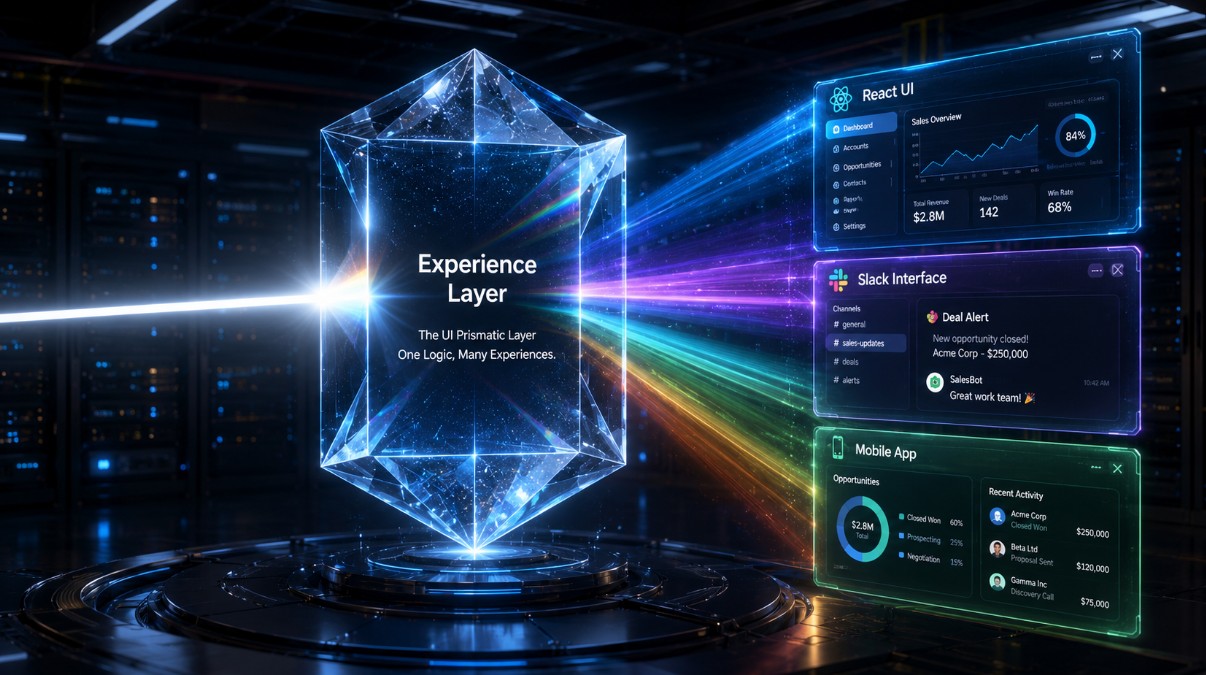
How the Summer ’26 release separates AI logic from the UI, allowing developers to build once and deploy natively across Slack, WhatsApp, and custom React frontends.
The Omnichannel AI Bottleneck
If you have spent the last two years building AI agents and enterprise chatbots, you are painfully aware of the “omnichannel bottleneck.”
Historically, deploying an intelligent agent required tightly coupling the AI’s reasoning logic with the presentation layer. If you wanted your AI to assist customers on your community portal, you built a Lightning Web Component (LWC). If you wanted that same agent to assist internal employees in Slack, you had to write a custom Slack app, manually format JSON for the Slack Block Kit, and manage external authentication. If you wanted it on WhatsApp, you wired up an external API.
Every time a business rule changed, you had to update three separate codebases. It was inefficient, brittle, and scaled terribly.
At TrailblazerDX 2026 and rolling out in the Summer ’26 Release, Salesforce fundamentally solved this architectural flaw by introducing the Agentforce Experience Layer as part of the broader Headless 360 initiative. Combined with the groundbreaking Salesforce Multi-framework Beta (which allows native React hosting on Salesforce), the way we build user interfaces for AI has changed forever.
This technical deep dive explores how the Experience Layer abstracts UI, how to write deterministic Agent Scripts, and how to deploy a native React component powered by GraphQL inside Salesforce.
The Agentforce Experience Layer: Abstracting the Interface
The Agentforce Experience Layer is a new UI service that separates what an agent does from where the interaction shows up.
The mantra is simple: Build once, render everywhere.
You define your agent’s business logic, tools, and topics centrally on the Agentforce 360 Platform. When the agent decides to present a user with a dynamic list of records or a confirmation button, it does not send HTML or LWC markup. It sends a semantic “Intent Payload.”
The Experience Layer sits between the agent and the client. It acts as a real-time translation engine:
- If the user is on Slack, the Experience Layer translates the intent into Slack Block Kit components.
- If the user is on Microsoft Teams, it translates it into Adaptive Cards.
- If the user is connecting via an external LLM client (like ChatGPT or Claude Code via the Model Context Protocol – MCP), it translates it into structured tool-call JSON.
The interface is no longer the product; the underlying data and business logic are the product. Your UI becomes fully portable.
Native React on Salesforce: The Multi-Framework Beta
Perhaps the most shocking developer announcement of 2026 is the Salesforce Multi-framework Beta. For over a decade, if you wanted to build native UIs on Salesforce, you used Visualforce, Aura, or LWC.
Now, the Experience Layer allows you to build AI agents and apps using industry-standard UI frameworks like React, running natively on the Agentforce 360 Platform. You can bring your own component libraries (like Material-UI or Tailwind) while maintaining strict Salesforce governance.
Data Fetching with GraphQL
Because you aren’t using @wire adapters in React, data retrieval and mutation are handled via the highly optimized Salesforce GraphQL API.
Here is a practical example of a custom React widget built to interface with an Agentforce Subagent. Notice how we use the new @salesforce/agentforce-react library to seamlessly trigger server-side agentic logic.
import React, { useState } from 'react';
import { useQuery, gql } from '@salesforce/graphql';
import { useAgentAction } from '@salesforce/agentforce-react';

// 1. Fetch live context securely via GraphQL
const GET_ACCOUNT_CONTEXT = gql`
  query getAccount($id: ID!) {
    uiapi {
      query {
        Account(where: { Id: { eq: $id } }) {
          edges {
            node {
              Id
              Name
              Risk_Score__c { value }
            }
          }
        }
      }
    }
  }
`;

export default function AccountRiskWidget({ recordId }) {
    const { data, loading, error } = useQuery(GET_ACCOUNT_CONTEXT, { variables: { id: recordId } });

    // 2. Hook into the Agentforce Experience Layer
    const { executeAction, isExecuting } = useAgentAction('Agentforce_Escalation_Subagent');

    if (loading) return <div className="spinner">Loading context...</div>;
    if (error) return <div className="error">Error loading data.</div>;

    const account = data.uiapi.query.Account.edges[0].node;

    const handleEscalate = async () => {
        // 3. Trigger headless agent logic deterministically
        await executeAction({
            contextId: account.Id,
            intent: 'ESCALATE_HIGH_RISK',
            channel: 'REACT_CUSTOM_UI'
        });
    };

    return (
        <div className="p-4 border rounded-lg shadow-md bg-white">
            <h3 className="text-lg font-bold">{account.Name.value}</h3>
            <p className="text-gray-600">Calculated Risk Score: {account.Risk_Score__c.value}</p>

            {account.Risk_Score__c.value > 80 && (
                <button
                    className="mt-4 px-4 py-2 bg-red-600 text-white rounded hover:bg-red-700"
                    onClick={handleEscalate}
                    disabled={isExecuting}
                >
                    {isExecuting ? 'Agent Orchestrating Escalation...' : 'Trigger Autonomous Escalation'}
                </button>
            )}
        </div>
    );
}
Because this React app is anchored in the Agentforce 360 platform, it automatically inherits your user’s existing profile permissions, sharing rules, and Field-Level Security (FLS). It is not an external security risk; it is a governed extension of your CRM.
Controlling the Chaos: Enter Agent Script
Giving an LLM the ability to render dynamic UI components across multiple channels sounds incredibly risky. What if the model hallucinates a UI state?
To solve this, Salesforce introduced Agent Script, a domain-specific language for defining agent behavior deterministically.
Autonomous systems in enterprise environments require predictability. While you want the LLM to understand the natural language of the user, you do not want the LLM guessing the next business step.
Agent Script combines natural language instructions with programmatic, deterministic expressions. It allows you to strictly define transitions and state management.
// Example: Escalation_Subagent.agentscript

subagent "Risk_Escalation" {
    description: "Handles account risk escalations from any Experience Layer surface."

    // Deterministic state transition
    on_intent "ESCALATE_HIGH_RISK" {
        validate_state {
            require_field: "Account.Risk_Score__c", operator: ">", value: 80
            on_fail: return_error("Risk score is below escalation threshold.")
        }

        execute_action "Create_Swarm_Channel" {
            tool: mcp.slack.create_channel
            payload: {
                name: "escalation-${Account.Id}",
                invite: ["Risk_Team_Group"]
            }
        }

        // The Experience Layer handles rendering this dynamically to the user's current surface
        render_experience {
            component: "Success_Confirmation_Card"
            data: { message: "Escalation initiated. The Risk team has been notified in Slack." }
        }
    }
}
By writing Agent Scripts, you move workflows from probabilistic LLM reasoning to guaranteed, governed results.
Prototyping the Future: Agentforce Labs
If you are eager to test these capabilities, you don’t need to wait for a full production rollout. Salesforce recently launched Agentforce Labs (labs.agentforce.com).
Agentforce Labs is the new experimental hub where Salesforce Product and Engineering teams ship cutting-edge prototypes, open-source AI tools, and early-stage agentic capabilities. Available natively in Summer ’26 Developer Edition orgs, Labs gives you instant, sandbox-free prototyping. You can spin up an agent, connect it to your IDE via MCP servers, and test the Multi-framework React capabilities without complex infrastructure provisioning.
Impact for Companies and Developers
The Agentforce Experience Layer marks the end of siloed UI development.
For Developers: You no longer need to learn the proprietary syntax of Slack Block Kit, MS Teams Adaptive Cards, or various chatbot APIs. You write the logic once using Agent Script and Apex, and allow the platform to handle the cross-channel translation. Furthermore, the ability to use React and GraphQL opens Salesforce up to a massive global talent pool of frontend engineers.
For Architects & Security Teams: The Experience Layer resolves the shadow-IT problem of AI. Because external surfaces interact with Salesforce via the Experience Layer, all actions pass through the Salesforce Trust Layer. Audit trails, FLS, and sharing rules are enforced implicitly, regardless of whether the agent is triggered from a mobile app, a React dashboard, or an external instance of Claude.
Conclusion
The “Headless” era of Salesforce has arrived. By decoupling what an agent does from how it appears, the Agentforce Experience Layer allows enterprises to scale their AI strategies exponentially. Combined with deterministic Agent Scripts and the flexibility of native React hosting, the Salesforce platform has evolved into a true omnichannel orchestration engine.
Your Next Step: Log into your Trailblazer account and head to labs.agentforce.com. Spin up the Multi-framework playground, deploy your first React widget using GraphQL, and watch as your business logic renders seamlessly across multiple simulated environments. The interface is dead; long live the Experience Layer.